> ## Documentation Index
> Fetch the complete documentation index at: https://docs.captrid.com/llms.txt
> Use this file to discover all available pages before exploring further.
# Audit Logs
> View a complete record of who did what, when, and to which record — across your entire organisation.
CaptrID logs every significant action in your organisation automatically. Audit logs give you a complete, tamper-proof record of activity — useful for compliance, troubleshooting, and understanding who changed what.
## Viewing audit logs
1. From the sidebar, click **Audit Logs** (under the **Data** section)
2. You'll see a chronological list of actions, most recent first
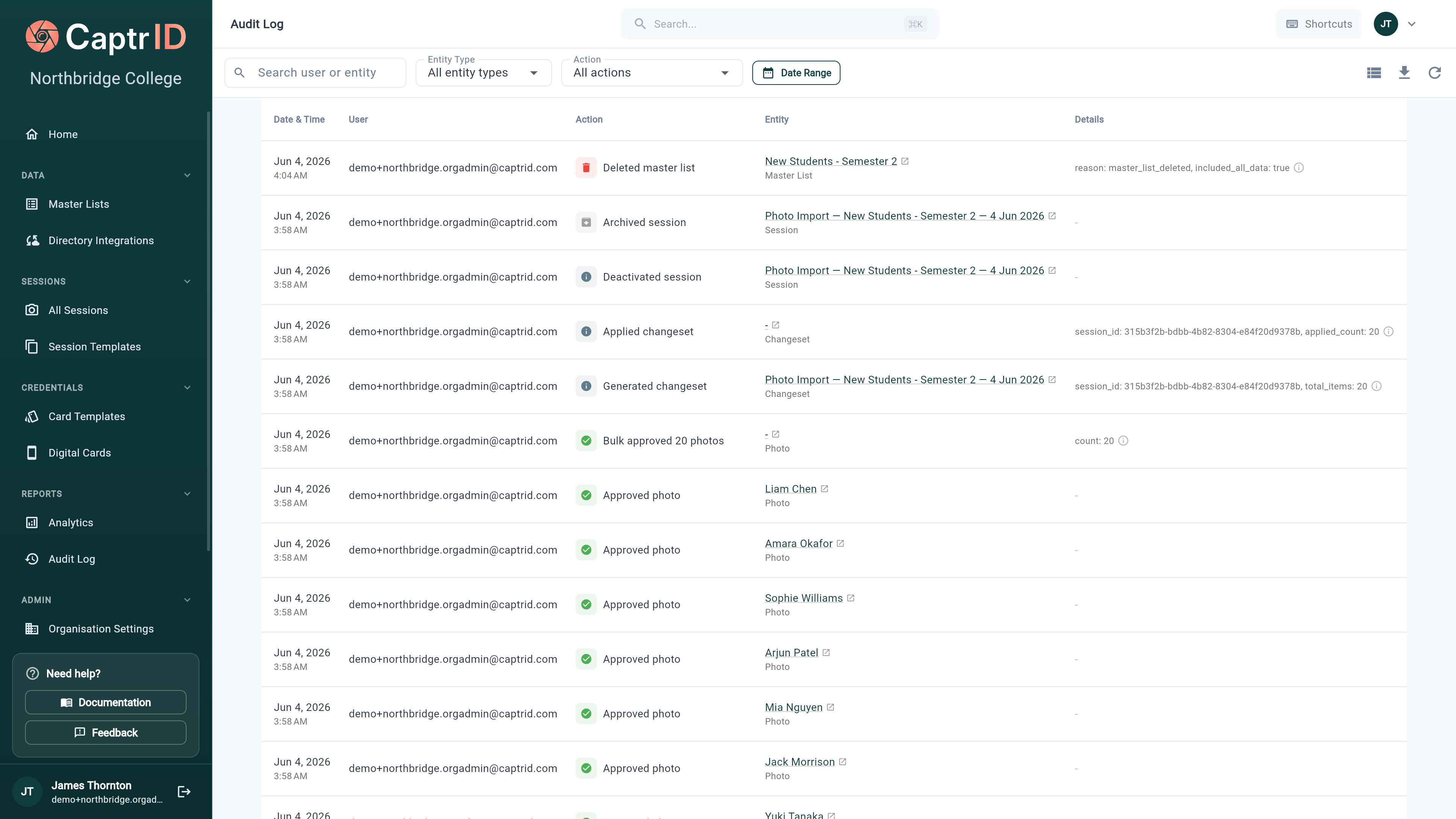 Each log entry shows:
| Field | Description |
| --------------- | ----------------------------------------------------------------- |
| **Action** | What happened (e.g. "Photo approved", "Session created") |
| **Entity** | Which record was affected (with a link to it, if it still exists) |
| **User** | Who performed the action |
| **Date & time** | When it happened |
| **Details** | Additional context (e.g. rejection reason, field values changed) |
## Filtering and searching
Use the controls at the top to narrow down the log:
Each log entry shows:
| Field | Description |
| --------------- | ----------------------------------------------------------------- |
| **Action** | What happened (e.g. "Photo approved", "Session created") |
| **Entity** | Which record was affected (with a link to it, if it still exists) |
| **User** | Who performed the action |
| **Date & time** | When it happened |
| **Details** | Additional context (e.g. rejection reason, field values changed) |
## Filtering and searching
Use the controls at the top to narrow down the log:
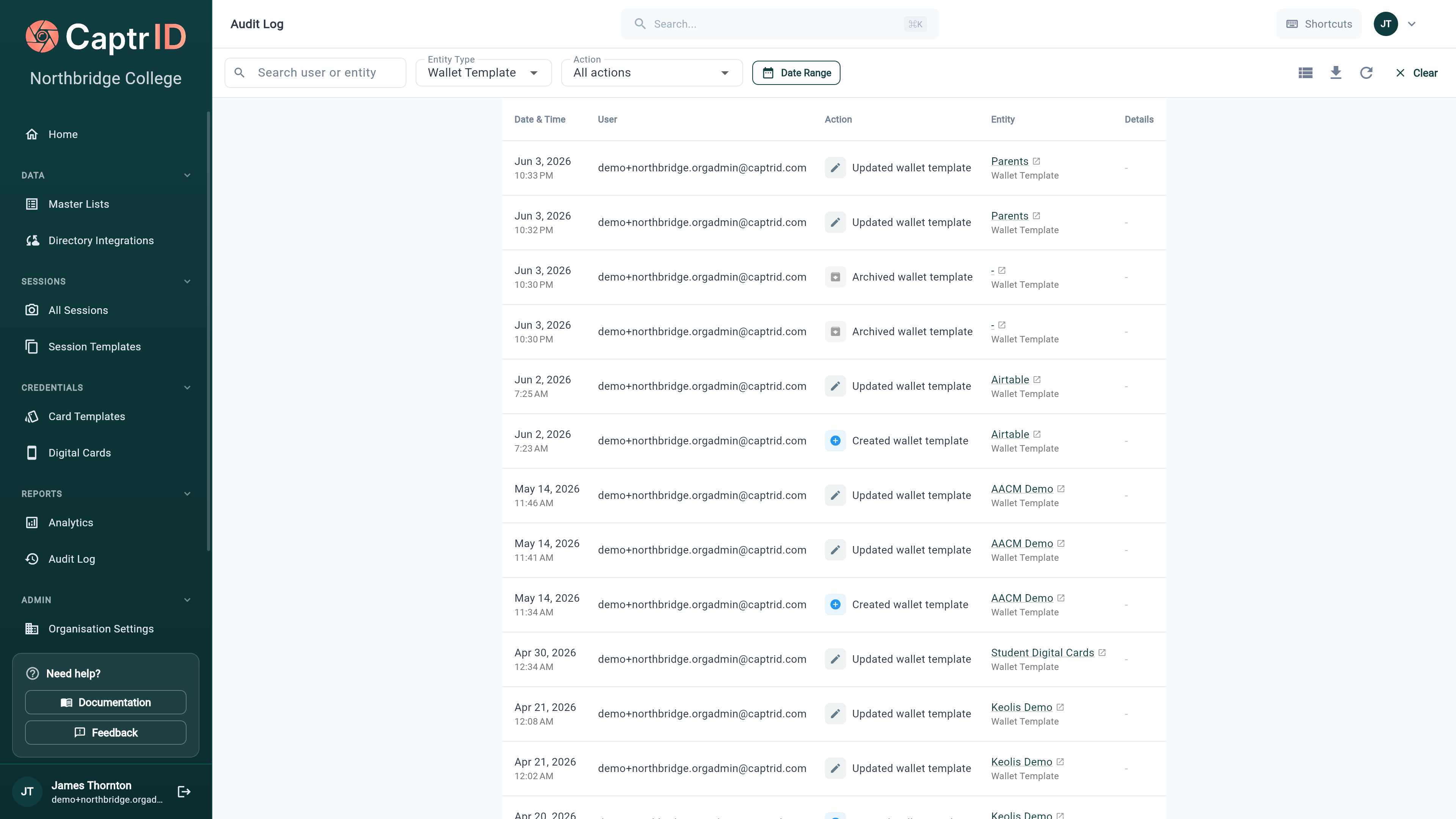 | Filter | Options |
| --------------- | -------------------------------------------------------------------------------------------------------------------------------------------------------------------------- |
| **Search** | Free-text search across user email and entity name |
| **Entity type** | Session, Session Field, Submission/Photo, Master List, Person, Changeset, Card Template, Wallet Template, Wallet Pass, Directory Sync, User, Export, Billing, Organisation |
| **Action** | Created, Updated, Deleted, Archived, Approved, Rejected, Applied, Rolled Back, Deactivated, Reactivated, Erased, and more |
| **Date range** | From/to date picker |
Filters combine with **AND** logic — for example, you can search a user's email *and* filter to **Wallet Template** events in the last 7 days.
The entity-type filter is the quickest way to audit one area — set it to **Wallet Template** to see every pass-template change, or **Directory Sync** to review configuration changes to a connection.
## Common action types
| Action | When it's logged |
| ---------------------------------------------------- | ---------------------------------------------------------- |
| `session.created` | A new session is created |
| `session.archived` | A session is archived |
| `photo.approved` | A photo submission is approved |
| `photo.rejected` | A photo submission is rejected |
| `changeset.generated` | A changeset is generated from a session |
| `changeset.applied` | A changeset is applied to a Master List |
| `changeset.rolled_back` | A changeset is rolled back |
| `person.created` | A person is added to a Master List or session |
| `person.deactivated` / `person.reactivated` | A person is soft-deleted or restored |
| `person.erased` | A person's data is permanently erased (GDPR) |
| `master_list.deleted` | A Master List is deleted (its passes are revoked first) |
| `pass.generated` | A wallet pass is created |
| `pass.revoked` | A wallet pass is revoked |
| `pass.verified` | A wallet pass QR code is scanned for verification |
| `wallet_template.created` / `.updated` / `.archived` | A wallet pass template changes |
| `directory.configured` / `.scheduled` / `.removed` | A directory connection's sync config changes |
| `user.created` | A team member is added to the organisation |
| `export.started` / `.completed` / `.downloaded` | An export job moves through its lifecycle |
| `billing.*` | Plan changes, subscription, and payment events from Stripe |
This isn't the full list — coverage has expanded across billing, provisioning, directory sync, exports, and per-field schema changes. Use the **Entity type** filter to browse a specific area.
## Exporting audit logs
Click **Export to CSV** to download the filtered log entries as a spreadsheet. This is useful for compliance reporting or sharing with auditors.
The export includes all columns: date, user, action, entity type, entity name, and details.
Exports are capped at **10,000 rows**. If your filtered result exceeds this, CaptrID warns you and exports the most recent 10,000 — narrow the date range or entity type to capture the rest.
## Who can see audit logs
| Role | Access |
| ---------------------- | ----------------------------- |
| **Organisation Admin** | Full access to all audit logs |
| **Coordinator** | Can view audit logs |
| **Capturer** | No access |
Audit logs are immutable — they cannot be edited or deleted, even by Organisation Admins. This ensures a trustworthy record for compliance purposes.
## What's next?
Learn how to permanently erase a person's data for GDPR compliance (logged in audit trail).
Configure data retention, auto-archive, and coordinator permissions.
| Filter | Options |
| --------------- | -------------------------------------------------------------------------------------------------------------------------------------------------------------------------- |
| **Search** | Free-text search across user email and entity name |
| **Entity type** | Session, Session Field, Submission/Photo, Master List, Person, Changeset, Card Template, Wallet Template, Wallet Pass, Directory Sync, User, Export, Billing, Organisation |
| **Action** | Created, Updated, Deleted, Archived, Approved, Rejected, Applied, Rolled Back, Deactivated, Reactivated, Erased, and more |
| **Date range** | From/to date picker |
Filters combine with **AND** logic — for example, you can search a user's email *and* filter to **Wallet Template** events in the last 7 days.
The entity-type filter is the quickest way to audit one area — set it to **Wallet Template** to see every pass-template change, or **Directory Sync** to review configuration changes to a connection.
## Common action types
| Action | When it's logged |
| ---------------------------------------------------- | ---------------------------------------------------------- |
| `session.created` | A new session is created |
| `session.archived` | A session is archived |
| `photo.approved` | A photo submission is approved |
| `photo.rejected` | A photo submission is rejected |
| `changeset.generated` | A changeset is generated from a session |
| `changeset.applied` | A changeset is applied to a Master List |
| `changeset.rolled_back` | A changeset is rolled back |
| `person.created` | A person is added to a Master List or session |
| `person.deactivated` / `person.reactivated` | A person is soft-deleted or restored |
| `person.erased` | A person's data is permanently erased (GDPR) |
| `master_list.deleted` | A Master List is deleted (its passes are revoked first) |
| `pass.generated` | A wallet pass is created |
| `pass.revoked` | A wallet pass is revoked |
| `pass.verified` | A wallet pass QR code is scanned for verification |
| `wallet_template.created` / `.updated` / `.archived` | A wallet pass template changes |
| `directory.configured` / `.scheduled` / `.removed` | A directory connection's sync config changes |
| `user.created` | A team member is added to the organisation |
| `export.started` / `.completed` / `.downloaded` | An export job moves through its lifecycle |
| `billing.*` | Plan changes, subscription, and payment events from Stripe |
This isn't the full list — coverage has expanded across billing, provisioning, directory sync, exports, and per-field schema changes. Use the **Entity type** filter to browse a specific area.
## Exporting audit logs
Click **Export to CSV** to download the filtered log entries as a spreadsheet. This is useful for compliance reporting or sharing with auditors.
The export includes all columns: date, user, action, entity type, entity name, and details.
Exports are capped at **10,000 rows**. If your filtered result exceeds this, CaptrID warns you and exports the most recent 10,000 — narrow the date range or entity type to capture the rest.
## Who can see audit logs
| Role | Access |
| ---------------------- | ----------------------------- |
| **Organisation Admin** | Full access to all audit logs |
| **Coordinator** | Can view audit logs |
| **Capturer** | No access |
Audit logs are immutable — they cannot be edited or deleted, even by Organisation Admins. This ensures a trustworthy record for compliance purposes.
## What's next?
Learn how to permanently erase a person's data for GDPR compliance (logged in audit trail).
Configure data retention, auto-archive, and coordinator permissions.