> ## Documentation Index
> Fetch the complete documentation index at: https://docs.captrid.com/llms.txt
> Use this file to discover all available pages before exploring further.
# Organisation Settings
> Configure coordinator permissions, session defaults, data retention, and other organisation-wide settings.
Organisation Settings let you control how CaptrID works across your entire organisation — from what coordinators can do, to how long session data is kept, to default session configuration.
Only **Organisation Admins** can access Organisation Settings. Coordinators and capturers cannot view or change these settings.
## Accessing settings
Go to **Organisation Settings** in the sidebar (under the admin section).
## Coordinator permissions
Coordinators have access to session management and photo review by default. Organisation Admins can grant additional capabilities using these toggles:
| Permission | What it allows |
| -------------------------- | -------------------------------------------------------------------------------------- |
| **View Master Lists** | Read-only access to master lists and people records |
| **Manage Master Lists** | Create, edit, archive lists, manage people, and import from CSV (includes view access) |
| **Manage Card Templates** | Create, edit, and delete organisation-wide card templates |
| **Sync Session Data Back** | Apply approved changesets to push session data back to a master list |
| **Review Data Sync** | Review and resolve conflicts in changesets before they're applied |
| **Delete Own Sessions** | Delete sessions that the coordinator created |
All permissions are **off by default**. Organisation Admins and Platform Admins always have full access regardless of these settings.
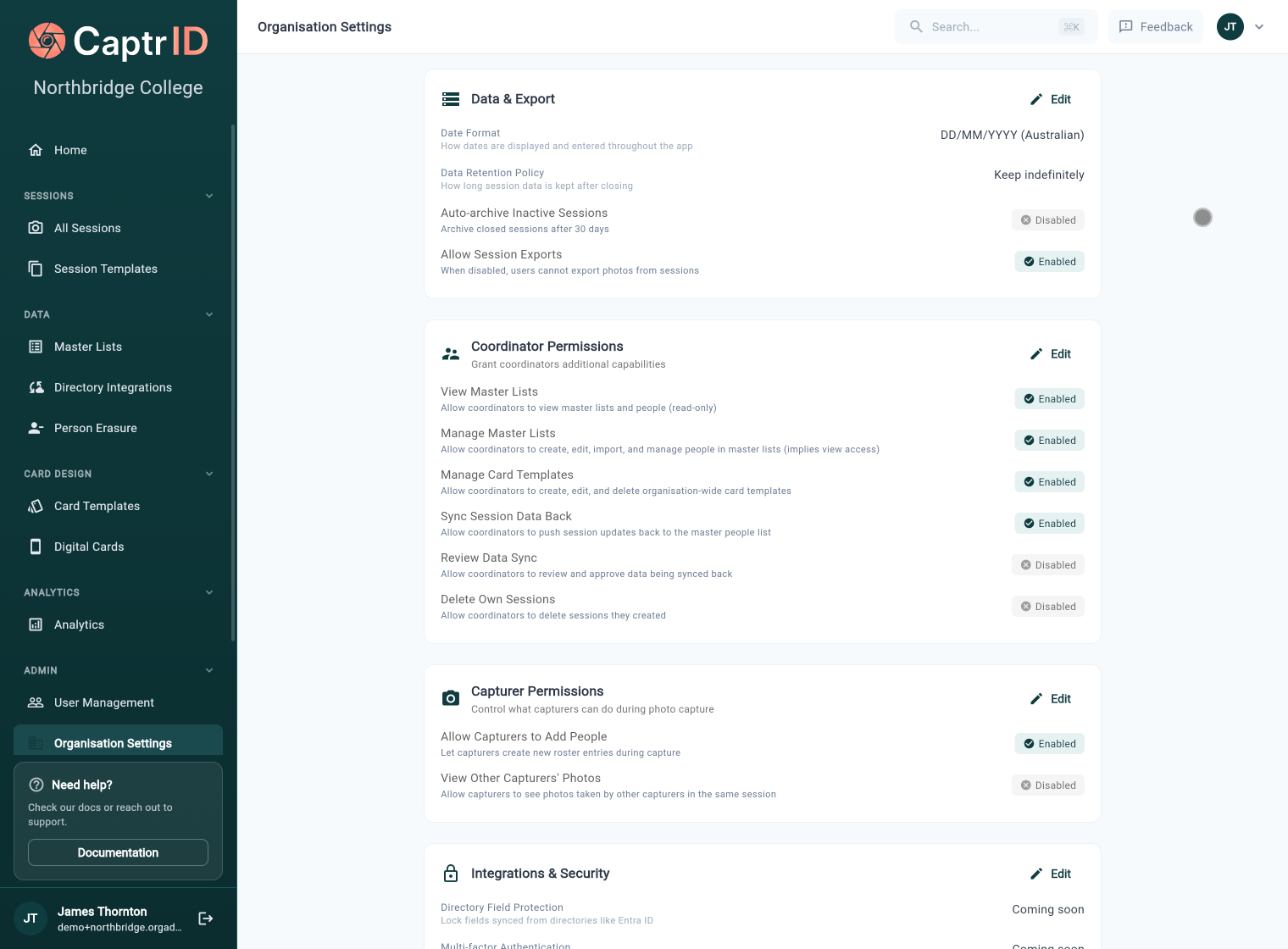 For most organisations, granting coordinators **View Master Lists** and **Review Data Sync** is a good starting point. This lets them see the roster context and review changesets without giving them full edit access.
### How permissions affect navigation
Coordinators only see sidebar items they have permission to access. For example, if **View Master Lists** is off, the Master Lists section won't appear in their sidebar at all.
## Session defaults
These settings are applied when creating new sessions. They can be overridden per session.
| Setting | Options |
| ----------------------------- | --------------------------------------------------------- |
| **Default Aspect Ratio** | 3:4 Portrait, 4:5 Portrait, 1:1 Square |
| **People Entry Mode** | Roster + Walk-ins, Roster Only, Walk-ins Only |
| **Default Filename Template** | ID Only, ID - First Last, Last, First - ID |
| **Allow Walk-in Additions** | Let capturers add people not on the roster during capture |
## Data retention
Control how long session data is kept after a session is closed.
| Setting | Options |
| ---------------------------- | -------------------------------------------------------------------------------- |
| **Default Retention Policy** | Keep indefinitely, 30 days, 60 days, 90 days, 1 year, or a custom number of days |
When a session is closed, the retention countdown begins. After the period elapses:
1. You receive email warnings at **7 days** and **1 day** before expiry
2. All photos, submissions, and roster data are **permanently deleted**
3. The session record itself is preserved (empty, read-only) for reference
For most organisations, granting coordinators **View Master Lists** and **Review Data Sync** is a good starting point. This lets them see the roster context and review changesets without giving them full edit access.
### How permissions affect navigation
Coordinators only see sidebar items they have permission to access. For example, if **View Master Lists** is off, the Master Lists section won't appear in their sidebar at all.
## Session defaults
These settings are applied when creating new sessions. They can be overridden per session.
| Setting | Options |
| ----------------------------- | --------------------------------------------------------- |
| **Default Aspect Ratio** | 3:4 Portrait, 4:5 Portrait, 1:1 Square |
| **People Entry Mode** | Roster + Walk-ins, Roster Only, Walk-ins Only |
| **Default Filename Template** | ID Only, ID - First Last, Last, First - ID |
| **Allow Walk-in Additions** | Let capturers add people not on the roster during capture |
## Data retention
Control how long session data is kept after a session is closed.
| Setting | Options |
| ---------------------------- | -------------------------------------------------------------------------------- |
| **Default Retention Policy** | Keep indefinitely, 30 days, 60 days, 90 days, 1 year, or a custom number of days |
When a session is closed, the retention countdown begins. After the period elapses:
1. You receive email warnings at **7 days** and **1 day** before expiry
2. All photos, submissions, and roster data are **permanently deleted**
3. The session record itself is preserved (empty, read-only) for reference
 Data retention deletion is permanent and cannot be undone. Make sure you've exported any data you need before the retention period expires.
Individual sessions can override the organisation default with their own retention policy.
## Auto-archive
Automatically archive sessions that have been inactive (closed) for a period of time.
| Setting | Options |
| ---------------------------------- | --------------------------------------- |
| **Auto-archive inactive sessions** | On / Off |
| **Archive after** | 7, 14, 30, 60, or 90 days of inactivity |
Archived sessions are hidden from the default session list but can still be viewed, exported, and restored.
## Data and export
| Setting | Description |
| ------------------------- | --------------------------------------------------------------------------- |
| **Date Format** | DD/MM/YYYY (Australian), MM/DD/YYYY (US), or YYYY-MM-DD (ISO) |
| **Allow Session Exports** | Toggle to enable or disable photo and data exports across your organisation |
## Capturer permissions
Control what capturers can do during photo capture:
| Setting | Default | Description |
| --------------------------------- | ------- | -------------------------------------------------------------------------- |
| **Allow Capturers to Add People** | On | Let capturers create new roster entries during capture |
| **View Other Capturers' Photos** | Off | Allow capturers to see photos taken by other capturers in the same session |
Data retention deletion is permanent and cannot be undone. Make sure you've exported any data you need before the retention period expires.
Individual sessions can override the organisation default with their own retention policy.
## Auto-archive
Automatically archive sessions that have been inactive (closed) for a period of time.
| Setting | Options |
| ---------------------------------- | --------------------------------------- |
| **Auto-archive inactive sessions** | On / Off |
| **Archive after** | 7, 14, 30, 60, or 90 days of inactivity |
Archived sessions are hidden from the default session list but can still be viewed, exported, and restored.
## Data and export
| Setting | Description |
| ------------------------- | --------------------------------------------------------------------------- |
| **Date Format** | DD/MM/YYYY (Australian), MM/DD/YYYY (US), or YYYY-MM-DD (ISO) |
| **Allow Session Exports** | Toggle to enable or disable photo and data exports across your organisation |
## Capturer permissions
Control what capturers can do during photo capture:
| Setting | Default | Description |
| --------------------------------- | ------- | -------------------------------------------------------------------------- |
| **Allow Capturers to Add People** | On | Let capturers create new roster entries during capture |
| **View Other Capturers' Photos** | Off | Allow capturers to see photos taken by other capturers in the same session |